Technical SEO is an advanced part of On-page SEO techniques, It helps search engines to improve website crawl.

10 Tips for Technical SEO Audit:
1. Verify your website with Google Search Console.
2. Check Page Speed.
3. Submit the XML Sitemap.
4. Submit the Robots.txt file.
5. Use HREF-LANG for Multilingual.
6. Ensuring the website's Mobile-friendliness.
7. URL structure.
8. Consolidate duplicate URLs.
9. Fix the Error Pages and Redirects.
10. Create Structured Data.
1. Verify your website with Google Search Console:
Google Search Console is an SEO helper tool, Google provides this tool for all of Google Gmail owners at free of cost.
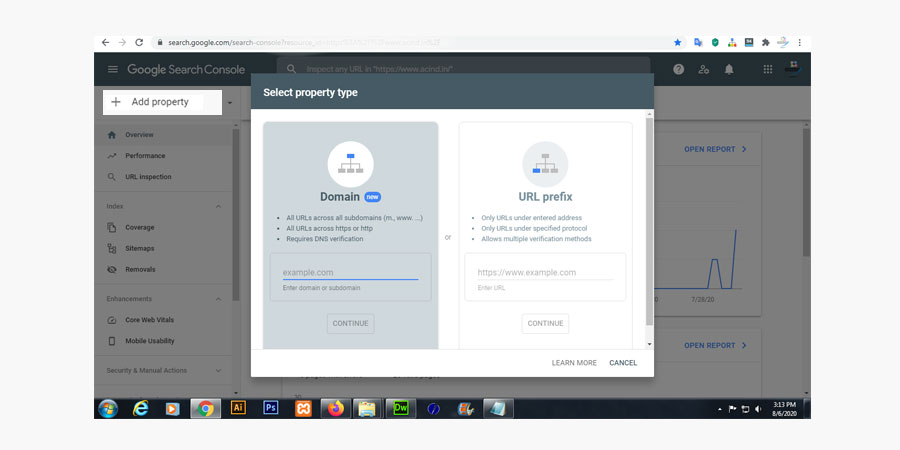
If you already have a google account, you may proceed to create the Search Console account. Or create a Gmail account and click the Add property button
If you already have a google account, you may proceed to create the Search Console account. Or create a Gmail account and click the Add property button
( Left top corner in the "Search Console" dashboard ) inside the "Search Console" dashboard.
Read the instruction and verify your domain name/Website.
2. Check Page Speed:
Check webpage speed, under Google Search Console. You may check it on another web page speed Check-tool. But my best choice is the PageSpeed Insights tool.Check page speed, read instructions, and fix the issues.
3. Submit the XML Sitemap:
The XML Sitemap is a hidden URL's directory, which is created by the XML format. It helps Google and other search engines to find your website URL easily.Learn, XML tag definitions, Sitemap formats, Validating your Sitemap, Extending the Sitemaps protocol, Sitemap file location, and many more at sitemaps.org.
You may create your website Sitemap at XML format with the help of an online XML-Sitemaps Generator.
4. Submit the Robots.txt file:
A Robots-TXT file will tell the search engines to which page needs crawled, and which pages not to be crawled, at the website.
Robots.txt - SampleUser-agent: *
Disallow: /
Sitemap: https://www.example.in/sitemap.xml
Search engines always follow the instruction of the Robots-TXT file to indexing a webpage. Mainly it uses for avoiding unexpected web-crawl or server loading.
Upload your new robots.txt file to the root of your domain as a text file named robots.txt (the URL for your robots.txt file should be/robots.txt).
5. Use Hreflang for Multilingual:
By using Hreflang-code, a web spider can inform the search engines what URLs specified for what language, or what targeted at a different region on your website.<head> <link rel="alternate" hreflang="lang_code"/> </head> for single URL
<head><link rel="alternate" hreflang="lang_code" href="url_of_page"/></head> for multiple URL
6. Ensuring the website's Mobile-friendliness:
A website's Mobile-friendliness is another important issue to improve the Technical SEO and search engine rankings. Ensure your website layout (Mobile-friendliness/responsiveness) before the request to indexing at Google Search Console.Basically, the website's Mobile-friendliness depends on following issues:
- Uses incompatible plugins
- Viewport not set
- Viewport not set to "device-width"
- Content wider than screen
- Text too small to read
- Clickable elements too close together
7. URL structure:
SEO friendly, URL structure making is another important strategy of Technical-SEO.For best practices, add your keyword to the webpage's URL. SEO friendly URL will help the search engine to understand what the page matter is all about.
Note: Don't use special character and underscores to URL, also try to include your keyword only.
Examples are given below:
example.com/technical-seo-strategy.php (✔)
example.com/page.php?technical_seo_strategy=18523 (✖)
8. Consolidate duplicate URLs:
Search engines hate duplicate contents or URLs.Duplicate Content means that similar content appears at multiple URLs (locations) on the web due to which search engines get confused about which URL it needs to show in the search results.
For the best practice, avoid this type of duplicate content and make unique titles, heading tags, and meta descriptions for each page.
For the best solution about duplicate contents, create canonical URLs that' are the best way to eliminate duplicate content in URL.
<link rel="canonical" href="https://example.com/technical-seo-strategy.php" />
Important notes:
- If you copy the content from any famous site, declare it honestly.
- Have a huge number of duplicate contents on the website? - As a result, the search engines may penalize the site.
9. Error Pages and Redirects:
When searching for something at Google, you might note some URL message sometime, like page not found, you get a warning, Or you’ve seen 301 redirects in action all over the web, but you may not have realized it.Example: Type - https://example.in into your URL bar, and hit enter. When the site loads, you’ll see something different in the address bar (ⓘ example.in)
10. Create Structured Data:
Structured data, providing information about your webpage content.It helps search engines to understand the content type or category of the page, as well as to gather information about the web in general.
For example: on web designing website page, what kind of service providers, service time, service location, service cost, and many more.
Related Articles: What is Technical SEO? || What is Off-Page SEO? || 8 Tips about On-page SEO strategies
